
Features › Merch with Square
Merch with Square
Live merch numbers from Square for the whole tour, without a second spreadsheet.
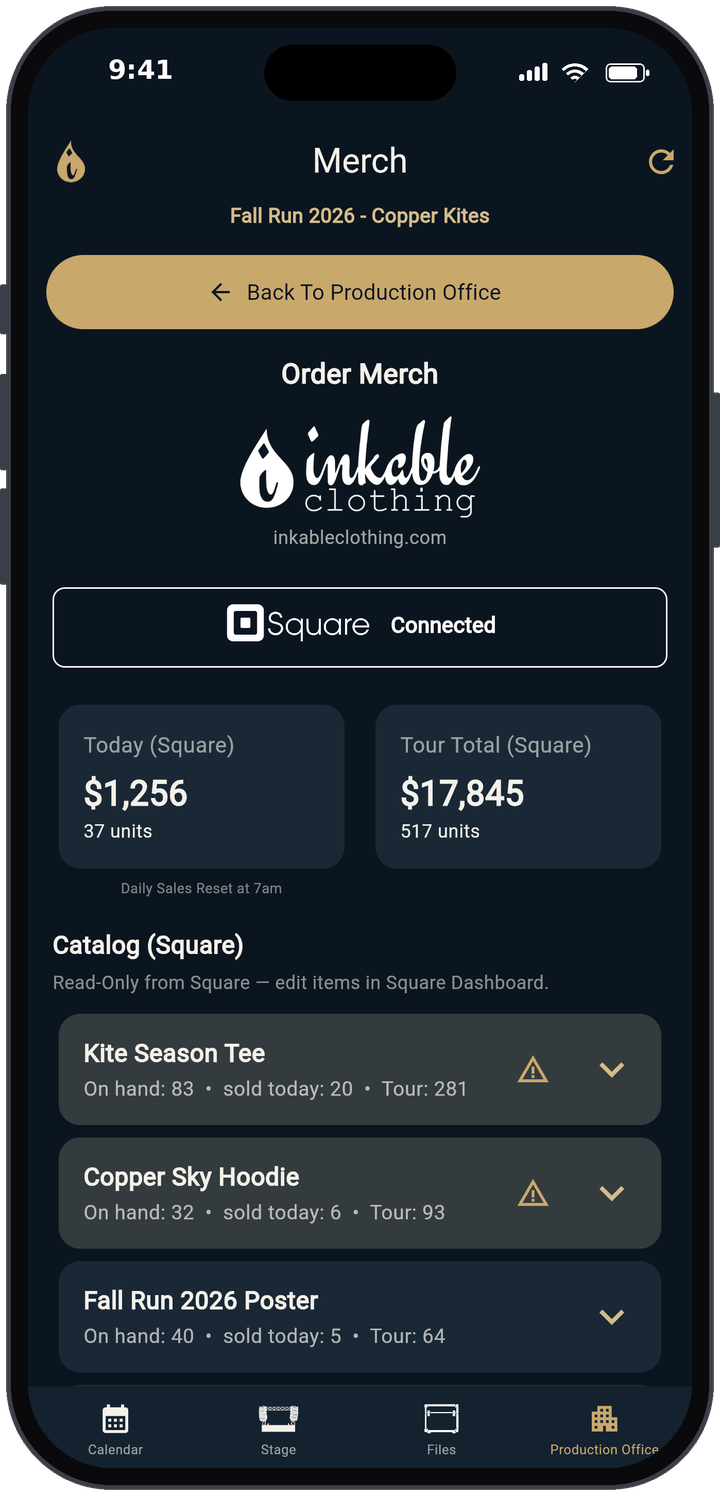
Connect Square
Go to Production Office → Merch. The tour owner taps Connect with Square and approves access in Square. The button then shows Connected. Nothing is charged, and you can disconnect any time.
What you see
- Today (Square) and Tour Total (Square): sales and units for today and for the tour dates. Daily sales reset at 7am.
- Catalog (Square): each item with on-hand, sold today and tour counts. Tap the arrow to show sizes. A caution icon marks low stock, based on the Low inventory threshold you set.
- Refresh Square (Read-Only): the circular-arrow icon at the top right pulls the latest numbers.
Read-only on purpose
TRMNGR doesn't change your Square items or prices and never charges cards. You edit the catalog in your Square Dashboard. Crew can be given view access to Merch, and it's always view-only.
Settling with the venue
TRMNGR shows the numbers. For the nightly count and the venue split, use the merch settlement calculator or the free merch count and settlement sheet. The show's Merch Settlement worksheet in Settlement records the merch gross and venue percentage.
Learn more
- Every button and setting: user guide
- Merch settlement and nightly merch counts
- How much merch to bring on tour
- Merch settlement calculator
Free templates
Try it on your own tour. TRMNGR runs in the browser, and the iPhone app is in beta.
Open TRMNGR Quick start
Open TRMNGR Quick start