
Features › Tour Calendar
Tour Calendar
The whole run at a glance: show, travel, off and rehearsal days in one shared calendar.
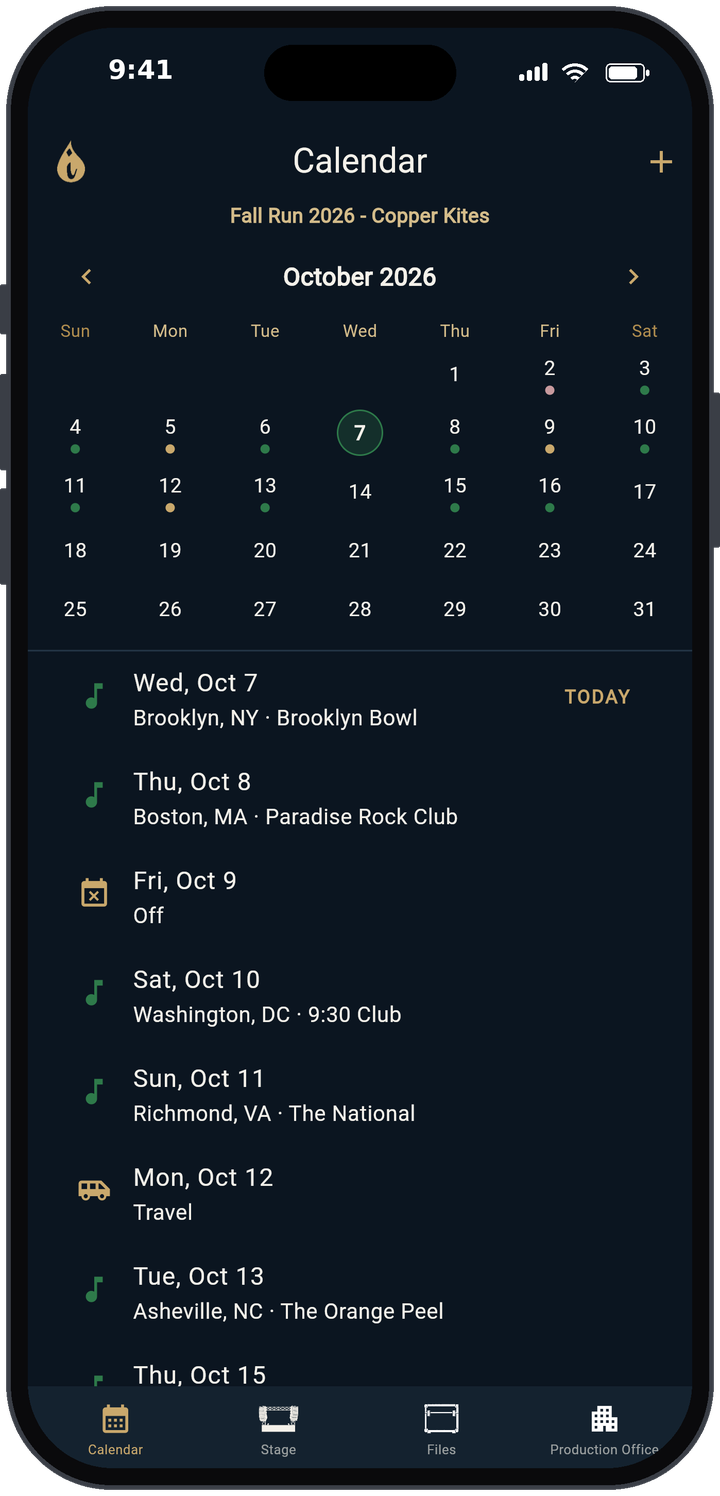
Month view and day list
The Calendar is the first tab in TRMNGR. The top is a month grid with colored dots under each tour day, colored by day type, with today ringed. Below it is a list of every tour day in date order with city and venue, and TODAY marked. Tap a date or a row to open that day.
Four day types
When you add a day (the + button on the Calendar), pick Show, Travel, Off or Rehearsal. Show days get the extra show boxes in Day View: Hospitality, Tech Rider, Tickets Sold and Guest List. Travel and off days stay simple.
Send days to Google Calendar
On the Google screen (Files → Sync with Google), tap Connect Google Calendar. TRMNGR creates its own TRMNGR calendar in your Google account and fills it with the open tour's days. Turn on Auto Update Calendar to keep it current, or tap Push Calendar to update it now. This is one-way: TRMNGR sends days to Google Calendar, and changes made in Google Calendar don't come back into TRMNGR.
Preferences that shape the calendar
In Preferences (Production Office → Profile): Week Starts On (Sun or Mon), Time Format (12h or 24h) and After Splash, Open (Calendar, Today or Last opened day).
Spreadsheet in, spreadsheet out
A whole tour can be exported to Excel and imported back from Production Office → All Tours → Import/Export, which is handy when someone outside the app needs the dates in a spreadsheet.
Learn more
- Every button and setting: user guide
- How to keep a shared tour calendar
- How to route a tour
- How to make a tour itinerary
- Drive time and lobby call calculator
Free templates
Open TRMNGR Quick start